Most recognition tools end at the thumbs-up. We end with delivery. Mobile-first for the 80% who never check email. AI-assisted. Recognition budgets by team, so the people closest to the work have something to give. Paired with 20,000+ real rewards your team actually wants.
The same Recognition Central on a desktop at HQ and a phone on the floor — one feed, one set of budgets, one dashboard. No separate app for the frontline to forget about.

Six things that used to be six tools — built into the Givenly platform, configured with you, owned by HR, and loved by the frontline employees who finally have a place where they're seen.
Peer-to-peer praise anyone can give, alongside spotlight stories, milestones, and company announcements. Public, threaded, and mobile-first — the social hub your company never had.
AI drafts the shoutout in your company's voice, tags the value it lives up to, and attaches the award. Smart prompts nudge managers and peers to recognize the right person at the right time.
Post a challenge, set the reward, watch your team play. Simple, parlay, and accumulated formats with a live leaderboard and mobile submissions straight from the field.
Company, team, and personal balances side by side. Fund a team and its manager spends against it — inside a per-recognition cap and an approval threshold you set once. Recognition runs on a rhythm, not on someone remembering.
The largest premium reward catalog in employee engagement — gifts, experiences, branded merchandise, and Gift of Choice, where recipients pick their own. Points in, real rewards out.
Thirteen widgets covering participation, sentiment, top recognizers, dollars-out, and budget spend by team. The number your board asks for, defended with data and exportable from day one.



You bought a recognition tool. Adoption stalled at 30%. Your CEO wants the engagement scores up by Q4. Sound familiar?
Most recognition tools are built for desk workers. The frontline never logs in — and never gets recognized.
Employees who don't feel recognized in the first 90 days leave within a year. You feel that math in your turnover line.
Your board wants the culture number. Your tool gives you a usage dashboard. Those are not the same thing.

Slack channels are noisy. Email gets deleted. The break-room bulletin board is forgotten. Recognition Central is the social hub your company never had — a single place where wins, shoutouts, milestones, and announcements live, and where your team actually engages.
Recognition dies when it's a blank text box on a Tuesday afternoon. Givenly's AI-assisted composer drafts the message, tags the company value, and attaches the right point award — your team just hits send. Easy. Fun. And impossible to forget.
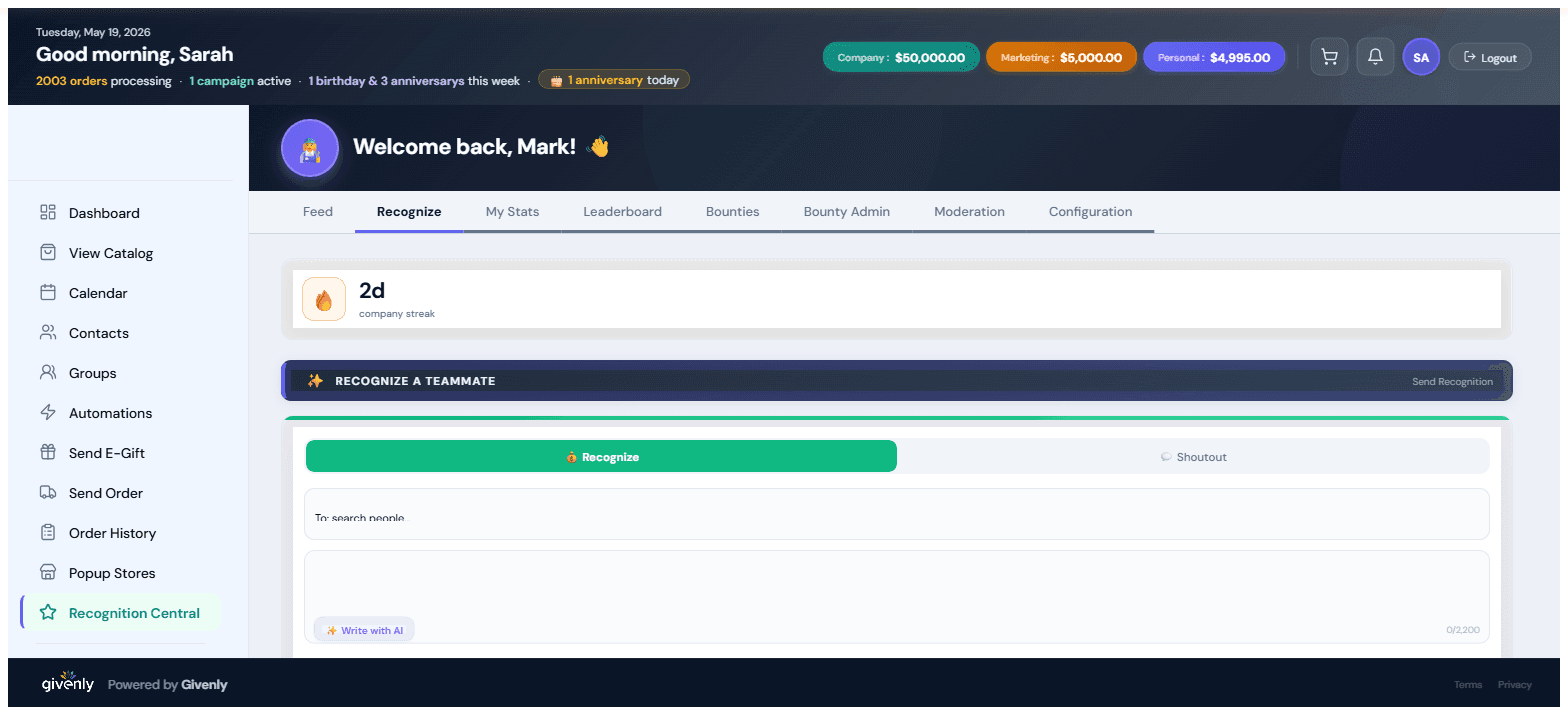
A recognition program doesn't go quiet because people stopped caring. It goes quiet because the manager who saw the work had nothing to hand out — ask one what they're allowed to spend and you'll get a shrug, then an email to HR. Fund a team's budget and the manager just spends it, inside a per-recognition cap and an approval threshold you set once. Managers get a number. Finance gets a ceiling.
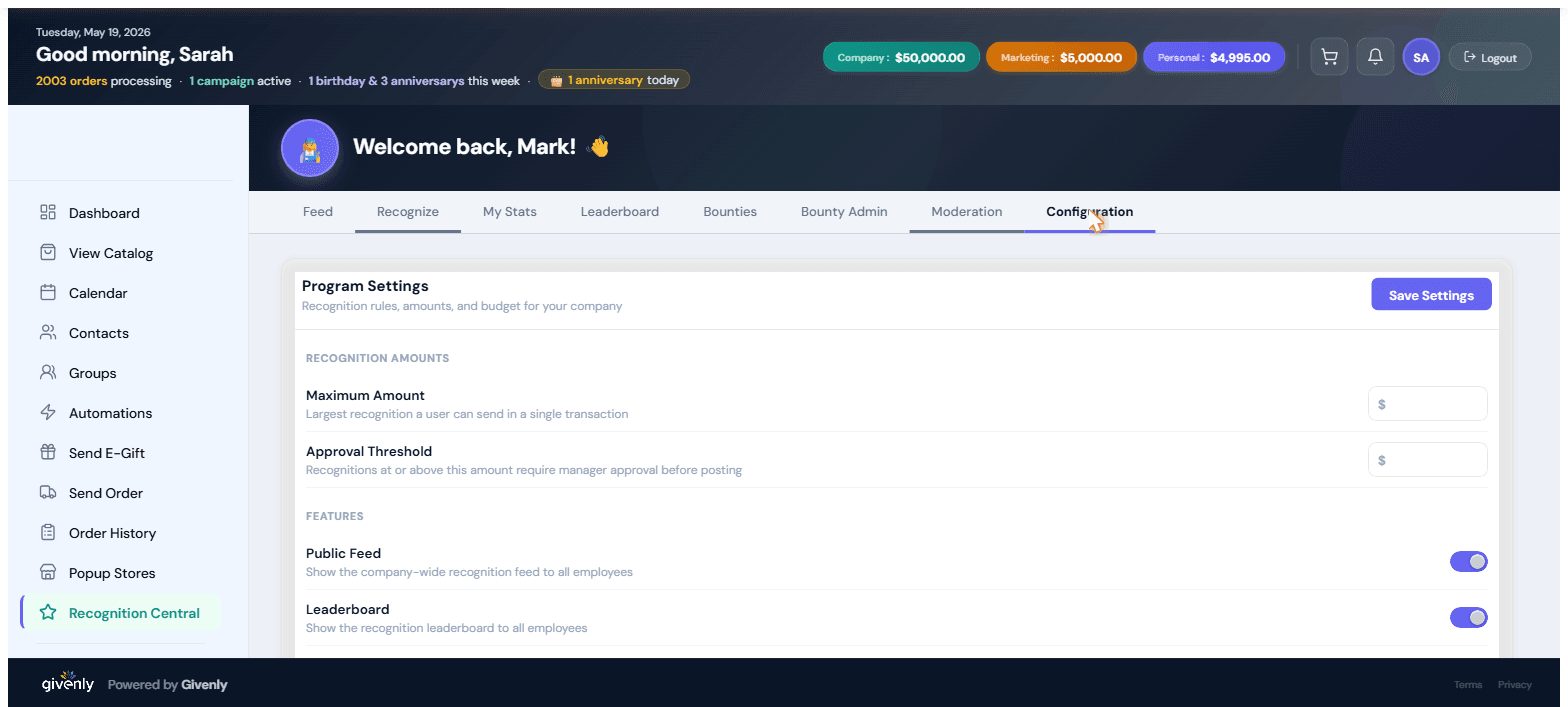
Company, team, and personal recognition budgets — from the Recognition Central Configuration tab.

Bounties turn culture into a game. Post a challenge — Safety Streak, Customer Win, NPS 9+, anything you'd want repeated — set the reward, and watch your team go. Gamified, public, and fun.
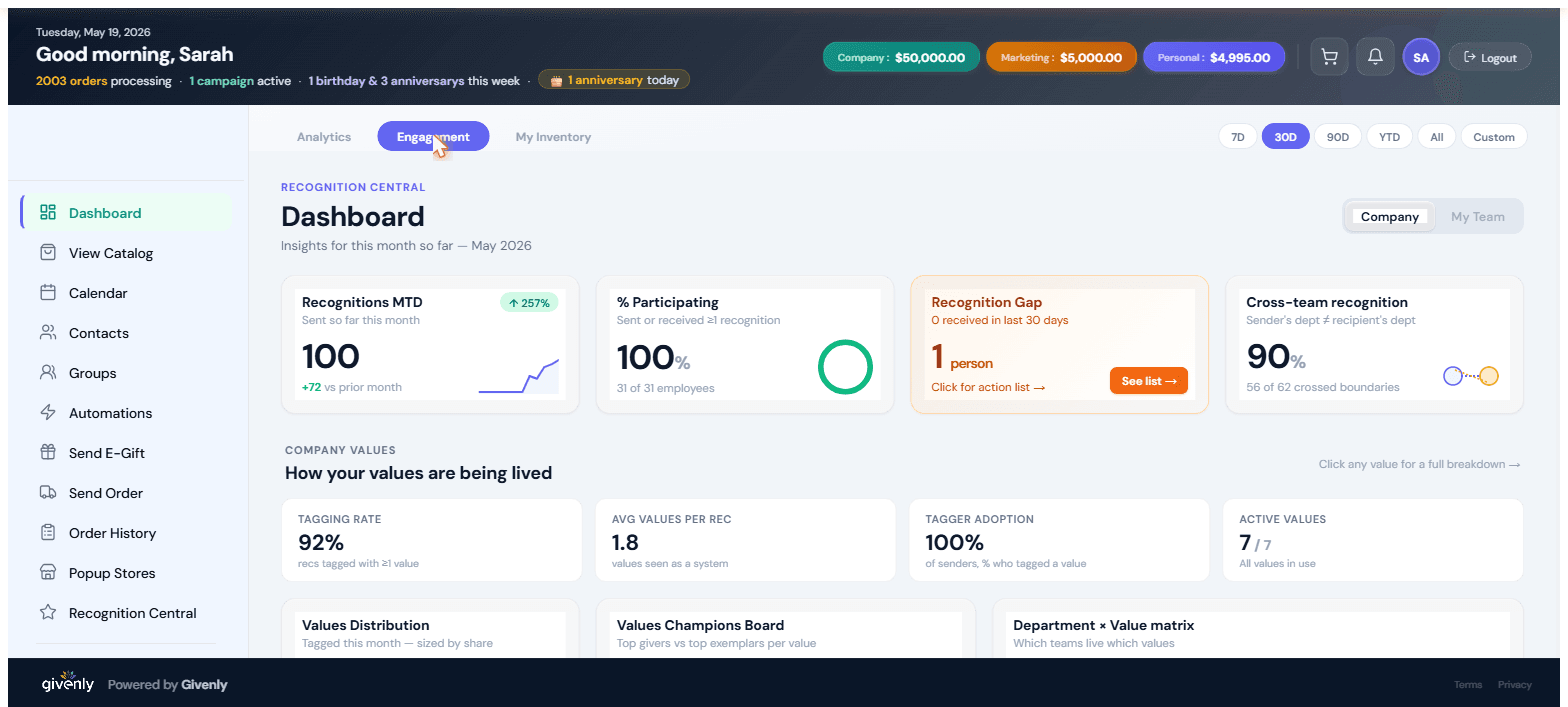
Thirteen widgets, one screen, every cut HR actually needs. Participation rate, sentiment trend, top recognizers, dollars-out, redemption velocity, recognition-by-value.
Frontline employees don't sit at desks — and a tool they can't open in 5 seconds is a tool they don't use. Recognition Central looks and feels like the apps they already use.
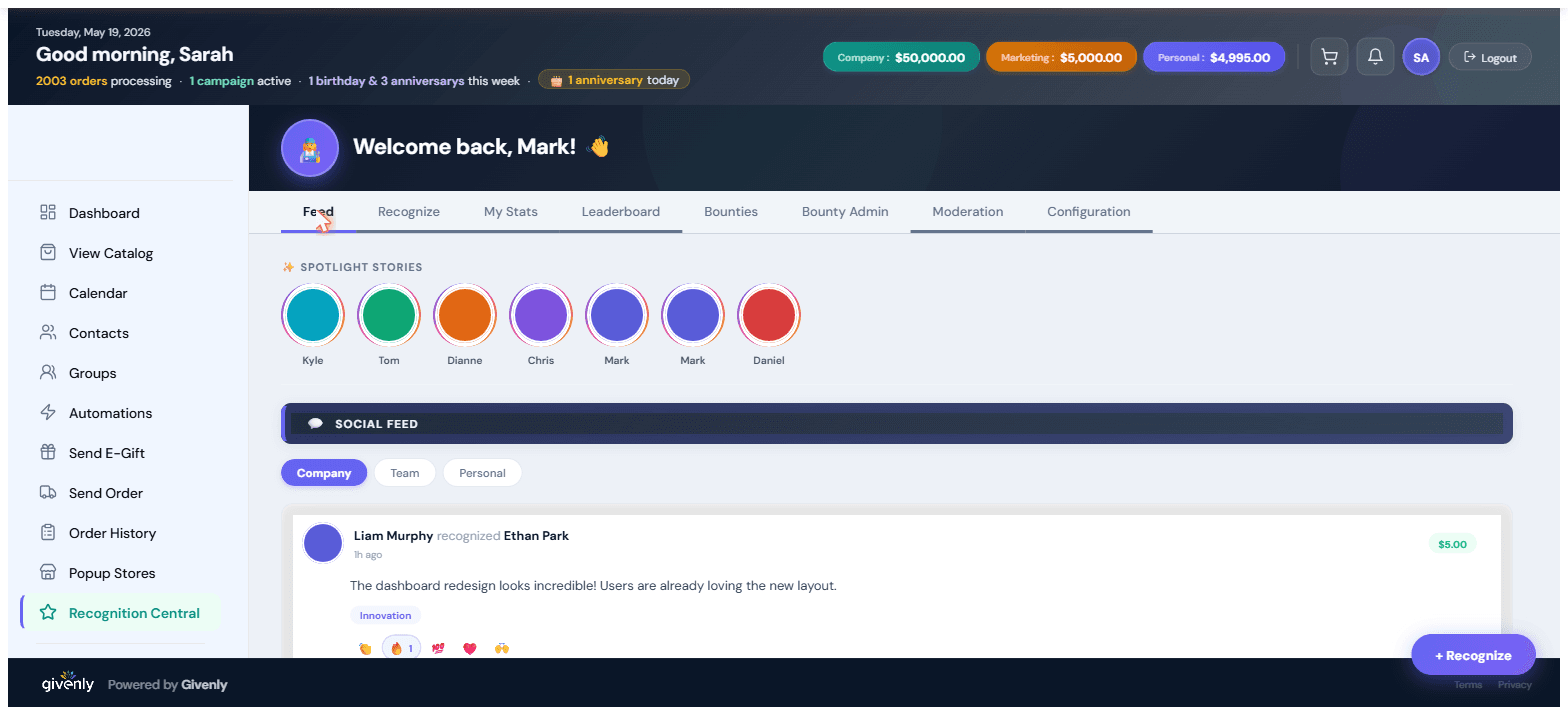
AI is built into every surface of Recognition Central — suggesting who deserves recognition, drafting bounty copy, and surfacing engagement risks before they hit retention.
We configure Recognition Central with you. HR owns it, and there's no engineering work on your side. Three steps, one Configuration tab.
One session with our team sets your company values, the company and team budgets, the Maximum Amount any single recognition can carry, the Approval Threshold above which a manager signs off, and which features each role can access — HRIS and SSO connections included. All from one Configuration tab.
Roll out to everyone or to a pilot team. Invitations, mobile onboarding, and the first bounty go out together. Most customers ship within five business days.
Watch the dashboard fill up. Export the participation and sentiment numbers to your next board update. Iterate the bounty calendar quarterly.
Recognition Central is one of five pillars — sharing the same engagement data, budget, and 20,000+ reward catalog.
Legacy tools were built for desk workers and treat recognition as a top-down email blast. Recognition Central is mobile-first, peer-to-peer, gamified through Bounties, and connected to the rewards your employees actually redeem. The Engagement Dashboard turns culture into a number you can show your CEO.
Some teams call these quotas — in Givenly they're recognition budgets. You fund a team's balance and its manager spends against it, alongside the company balance and each employee's personal balance; all three sit side by side in the top bar. In the Configuration tab you set the Maximum Amount any single recognition can carry, and the Approval Threshold above which a recognition routes to a manager before it posts. One thing to be clear about: a budget is a spending allowance, not a required minimum — there's no rule forcing anyone to hit a number.
Two places. The Engagement Dashboard rolls dollars-out up by department, team, and individual, next to participation and sentiment. And inside Recognition Central, My Stats shows each person's Given vs. Received totals and their giving streak, while the Leaderboard carries a Top Point Givers view you can filter by month or all-time — so recognition given is as visible as recognition received.
No — approval is threshold-based, not blanket. You set a dollar amount in Program Settings; recognitions at or above it require manager approval before posting, and everything below posts straight to the feed. You also set a Maximum Amount, the largest recognition any one user can send in a single transaction, so the ceiling holds without putting a reviewer in front of every thank-you.
Most customers are live within five business days. You'll do one configuration session with our team (values, approval workflow, point budget) and then we launch to a pilot group. No engineering work on your side.
Recognition Central is part of the Givenly platform — pricing is per-employee per-month, with the reward budget on top (you fund whatever amount fits your program). We'll size a proposal during the demo.
SAML SSO and SCIM provisioning are standard. We sync employees, departments, and managers from your HRIS so the org structure stays current without manual upkeep.
Givenly is SOC2 Type II, GDPR-aligned, and supports US data residency. Recognition data is tenant-isolated; no employee data leaves your environment without explicit configuration. We'll send the full security packet on request.
Yes — Recognition Central uses the same Brand-on-Demand engine that powers our company-store product. Your logo, palette, and from-name appear on every email, page, and mobile screen.
A 30-minute demo, tailored to your headcount and culture goals. We'll size the budget model with you — company, team, and personal — and show you the dashboard your CEO has been asking for.